| .. | ||
| src | ||
| Cargo.toml | ||
| README.md | ||

aquatic_http: high-performance open HTTP BitTorrent tracker

High-performance open HTTP BitTorrent tracker for Linux 5.8 or later.
Features at a glance:
- Multithreaded design for handling large amounts of traffic
- All data is stored in-memory (no database needed)
- IPv4 and IPv6 support
- Supports forbidding/allowing info hashes
- Prometheus metrics
- Automated CI testing of full file transfers
Performance
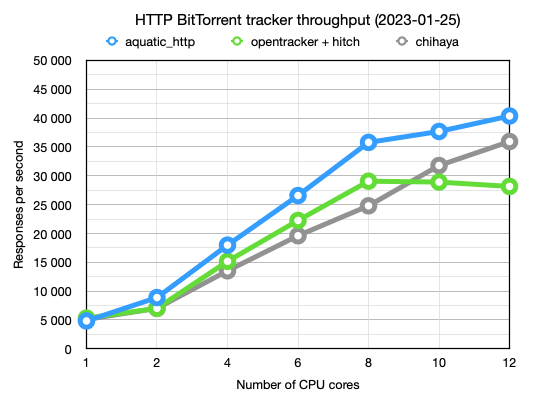
More benchmark details are available here.
Usage
Compiling
- Install Rust with rustup (latest stable release is recommended)
- Install cmake with your package manager (e.g.,
apt-get install cmake) - Clone this git repository and enter its root directory
- Build the application:
# Recommended: tell Rust to enable support for all SIMD extensions present on
# current CPU except for those relating to AVX-512. (If you run a processor
# that doesn't clock down when using AVX-512, you can enable those instructions
# too.)
. ./scripts/env-native-cpu-without-avx-512

cargo build --release -p aquatic_http
Configuring
Generate the configuration file:
./target/release/aquatic_http -p > "aquatic-http-config.toml"
Make necessary adjustments to the file. You will likely want to adjust address
(listening address) under the network section.
To run over TLS, configure certificate and private key files.
Running behind a reverse proxy is supported.
Running
Make sure locked memory limits are sufficient:
- If you're using a systemd service file, add
LimitMEMLOCK=65536000to it - Otherwise, add the following lines to
/etc/security/limits.conf, and then log out and back in:
*    hard    memlock    65536
*    soft    memlock    65536
Once done, start the application:
./target/release/aquatic_http -c "aquatic-http-config.toml"
If your server is pointed to by domain example.com and you configured the
tracker to run on port 3000, people can now use it by adding the URL
https://example.com:3000/announce to their torrent files or magnet links.
Load testing
A load test application is available. It supports generation and loading of configuration files in a similar manner to the tracker application.
After starting the tracker, run the load tester:
./scripts/run-load-test-http.sh
Details
Implements:
- BEP 003: HTTP BitTorrent protocol (more details). Exceptions:
- Only runs over TLS
- Doesn't track the number of torrent downloads (0 is always sent)
- Only compact responses are supported
- BEP 023: Compact HTTP responses
- BEP 007: IPv6 support
- BEP 048: HTTP scrape support. Notes:
- Doesn't allow full scrapes, i.e. of all registered info hashes
aquatic_http has not been tested as much as aquatic_udp, but likely works
fine in production.
Copyright and license
Copyright (c) 2020-2023 Joakim Frostegård
Distributed under the terms of the Apache 2.0 license. Please refer to the
LICENSE file in the repository root directory for details.