
7 KiB
aquatic


Blazingly fast, multi-threaded BitTorrent tracker written in Rust, consisting of sub-implementations for different protocols:
| Name | Protocol | OS requirements |
|---|---|---|
| aquatic_udp | BitTorrent over UDP | Unix-like |
| aquatic_http | BitTorrent over HTTP with TLS (rustls) | Linux 5.8+ |
| aquatic_ws | WebTorrent over TLS (rustls) | Unix-like with mio (default) / Linux 5.8+ with glommio |
Usage
Prerequisites
- Install Rust with rustup (stable is recommended)
- Install cmake with your package manager (e.g.,
apt-get install cmake) - Unless you're planning to only run the cross-platform mio based
implementations, make sure locked memory limits are sufficient.
You can do this by adding the following lines to
/etc/security/limits.conf, and then logging out and back in:
*    hard    memlock    512
*    soft    memlock    512
- Clone this git repository and enter it
Compiling
Compile the implementations that you are interested in:
# Tell Rust to enable support for all CPU extensions present on current CPU
# except for those relating to AVX-512. This is necessary for aquatic_ws and
# recommended for the other implementations.
. ./scripts/env-native-cpu-without-avx-512

cargo build --release -p aquatic_udp
cargo build --release -p aquatic_http
cargo build --release -p aquatic_ws
cargo build --release -p aquatic_ws --features "with-glommio" --no-default-features
Running
Begin by generating configuration files. They differ between protocols.
./target/release/aquatic_udp -p > "aquatic-udp-config.toml"
./target/release/aquatic_http -p > "aquatic-http-config.toml"
./target/release/aquatic_ws -p > "aquatic-ws-config.toml"
Make adjustments to the files. You will likely want to adjust address
(listening address) under the network section.
aquatic_http and aquatic_ws both require configuring a TLS certificate file as well as a
private key file to run. More information is available below.
Once done, run the tracker:
./target/release/aquatic_udp -c "aquatic-udp-config.toml"
./target/release/aquatic_http -c "aquatic-http-config.toml"
./target/release/aquatic_ws -c "aquatic-ws-config.toml"
Configuration values
Starting more socket workers than request workers is recommended. All
implementations are quite IO-bound and spend a lot of their time reading from
and writing to sockets. This is handled by the socket_workers, which
also do parsing, serialisation and access control. They pass announce and
scrape requests to the request_workers, which update internal tracker state
and pass back responses.
TLS
aquatic_ws and aquatic_http both require access to a TLS certificate file
(DER-encoded X.509) and a corresponding private key file (DER-encoded ASN.1 in
either PKCS#8 or PKCS#1 format) to run. Set their paths in the configuration file, e.g.:
[network]
address = '0.0.0.0:3000'
tls_certificate_path = './cert.pem'
tls_private_key_path = './key.pem'
Access control
Access control by info hash is supported for all protocols. The relevant part of configuration is:
[access_list]
mode = 'off' # Change to 'black' (blacklist) or 'white' (whitelist)
path = '' # Path to text file with newline-delimited hex-encoded info hashes
The file is read on start and when the program receives SIGUSR1. If initial
parsing fails, the program exits. Later failures result in in emitting of
an error-level log message, while successful updates of the access list result
in emitting of an info-level log message.
More information
More documentation of the various configuration options might be available
under src/config.rs in directories aquatic_udp, aquatic_http and
aquatic_ws.
Details on implementations
aquatic_udp: UDP BitTorrent tracker
Aims to implements the UDP BitTorrent protocol, except that it:
- Doesn't care about IP addresses sent in announce requests. The packet source IP is always used.
- Doesn't track of the number of torrent downloads (0 is always sent).
Supports IPv4 and IPv6.
Performance
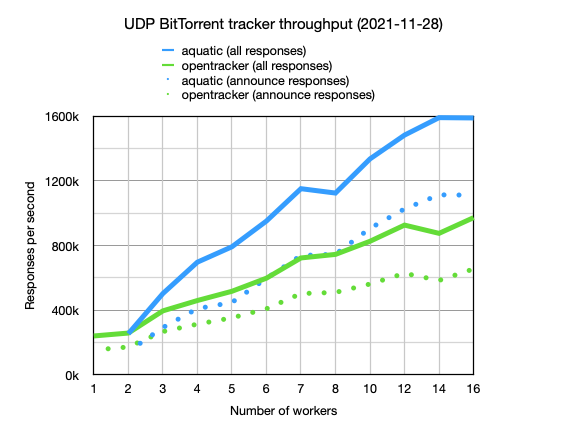
More details are available here.
Optimisation attempts that didn't work out
- Using glommio
- Using io-uring
- Using zerocopy + vectored sends for responses
aquatic_http: HTTP BitTorrent tracker
Aims for compatibility with the HTTP BitTorrent protocol, with some exceptions:
- Only runs over TLS
- Doesn't track of the number of torrent downloads (0 is always sent)
- Doesn't allow full scrapes, i.e. of all registered info hashes
aquatic_http has not been tested as much as aquatic_udp but likely works
fine.
aquatic_ws: WebTorrent tracker
Aims for compatibility with WebTorrent clients, with some exceptions:
- Only runs over TLS
- Doesn't track of the number of torrent downloads (0 is always sent).
- Doesn't allow full scrapes, i.e. of all registered info hashes
Load testing
There are load test binaries for all protocols. They use a CLI structure similar to the trackers and support generation and loading of configuration files.
To run, first start the tracker that you want to test. Then run the corresponding load test binary:
./scripts/run-load-test-udp.sh
./scripts/run-load-test-http.sh
./scripts/run-load-test-ws.sh
To fairly compare HTTP performance to opentracker, set keepalive to false in
aquatic_http settings.
Copyright and license
Copyright (c) 2020-2021 Joakim Frostegård
Distributed under Apache 2.0 license (details in LICENSE file.)
Trivia
The tracker is called aquatic because it thrives under a torrent of bits ;-)